In today’s digital world, artificial intelligence is making creative tasks easier than ever before. One of the most exciting tools available today is Gemini AI, which allows users to generate high-quality images using simple text prompts. Whether you are a content creator, blogger, or social media user, learning how to create images with AI can save time and improve your content quality.
In this article, we will explain step by step how to create photos using Gemini AI in a simple and easy way.
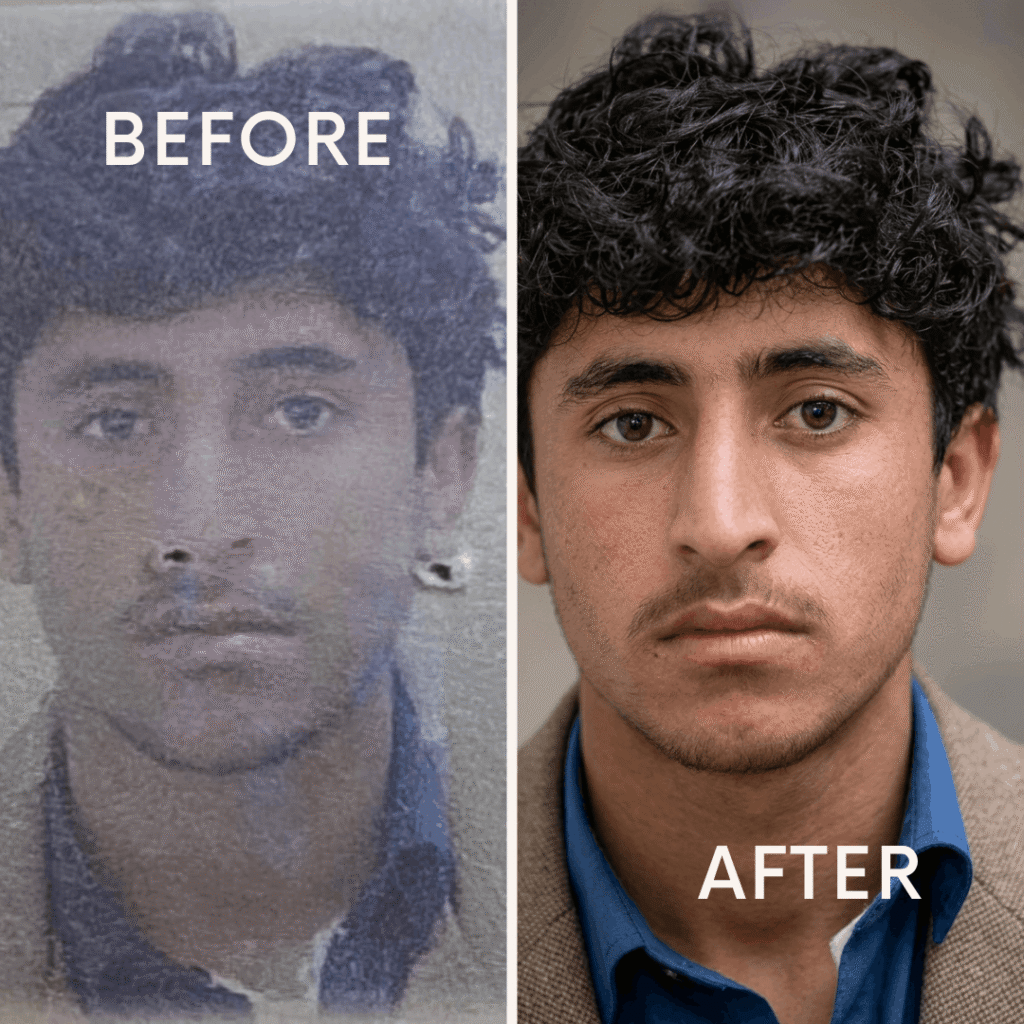
prompt
Restore and enhance this old passport photo.
Preserve the exact identity of the person, including face shape, eyes, nose, and expression.
Keep original clothes unchanged.
Improve image quality to high resolution, remove blur and noise, sharpen facial details,
fix lighting, and make skin tone natural.
Do not alter or generate a different face. Keep it realistic and professional.
What is Gemini AI?
Gemini AI is an advanced artificial intelligence tool developed by Google. It can understand text instructions and generate images, content, and ideas based on user input. It is especially useful for people who want to create unique visuals without professional design skills.
Why Use Gemini AI for Photo Creation?
There are many reasons why people are using AI tools like Gemini:
- No design skills required
- Fast image generation
- Creative and unique results
- Useful for social media and blogs
- Saves time and effort
This tool is perfect for beginners as well as professionals.
Step-by-Step Guide to Create Photos Using Gemini
Follow these simple steps to generate images:
Step 1: Open Gemini AI
First, go to the official Gemini platform using your browser and log in with your Google account.
Step 2: Enter a Prompt
In the input box, type a clear description of the image you want to create. For example:
“Create a realistic sunset over mountains with a lake view”
Step 3: Be Specific
The more detailed your prompt, the better your result will be. You can include:
- Colors
- Background
- Style (realistic, cartoon, cinematic)
- Lighting
Step 4: Generate Image
Click on the generate button and wait a few seconds. Gemini AI will create an image based on your description.
Step 5: Download or Edit
Once the image is ready, you can download it or refine your prompt to improve the result.
Tips for Better Results
To get high-quality images, follow these tips:
- Use clear and detailed descriptions
- Avoid very short prompts
- Experiment with different styles
- Try multiple prompts for better results
Practice is the key to mastering AI image creation.
Common Uses of AI Images
You can use AI-generated images in many ways:
- Blog thumbnails
- Social media posts
- YouTube thumbnails
- Digital marketing
- Creative projects
However, always make sure your usage follows platform guidelines.
Is Gemini AI Free?
Gemini offers both free and premium features. The free version is enough for basic image creation, but advanced features may require a subscription.
Is It Safe to Use?
Yes, Gemini AI is safe to use as long as you follow proper guidelines. Avoid creating harmful, misleading, or copyrighted content.
❓ Frequently Asked Questions (FAQs)
Q1: Can beginners use Gemini AI easily?
Yes, Gemini AI is designed to be user-friendly. Even beginners can create images easily by typing simple prompts.
Q2: Do I need any design skills?
No, you do not need any design or editing skills. The AI does all the work for you.
Q3: Can I use AI images for my blog?
Yes, you can use AI-generated images for blogs and social media, but make sure to follow copyright and platform rules.
Q4: Why is my image not looking good?
This usually happens due to unclear prompts. Try to write more detailed and specific descriptions.
Q5: Is Gemini better than other AI tools?
Gemini is a powerful tool, but the quality depends on how you use it. Other tools also offer similar features.
Conclusion
Gemini AI is a powerful and easy-to-use tool for creating images without any technical skills. By using simple text prompts, anyone can generate beautiful and creative visuals within seconds. Whether you are a beginner or an experienced creator, learning how to use AI tools like Gemini can help you improve your content and save time.
Start experimenting with different prompts today and explore the creative possibilities of AI image generation.